Appearance
Getting Started with BookStack
BookStack is an information management platform designed to help teams organize, store, and share knowledge. Whether you're building internal documentation, a company wiki, or a personal knowledge base, BookStack provides a structured way to keep everything accessible.
The Homepage
When you first open BookStack, you'll see the homepage dashboard. This view shows:
- Recent Books [1] — A list of books that have been recently created or updated, giving you quick access to active content.
- Recently Updated Pages — Individual pages across all books that have been modified recently.
- Recent Activity — A feed showing who made changes, what they changed, and when.
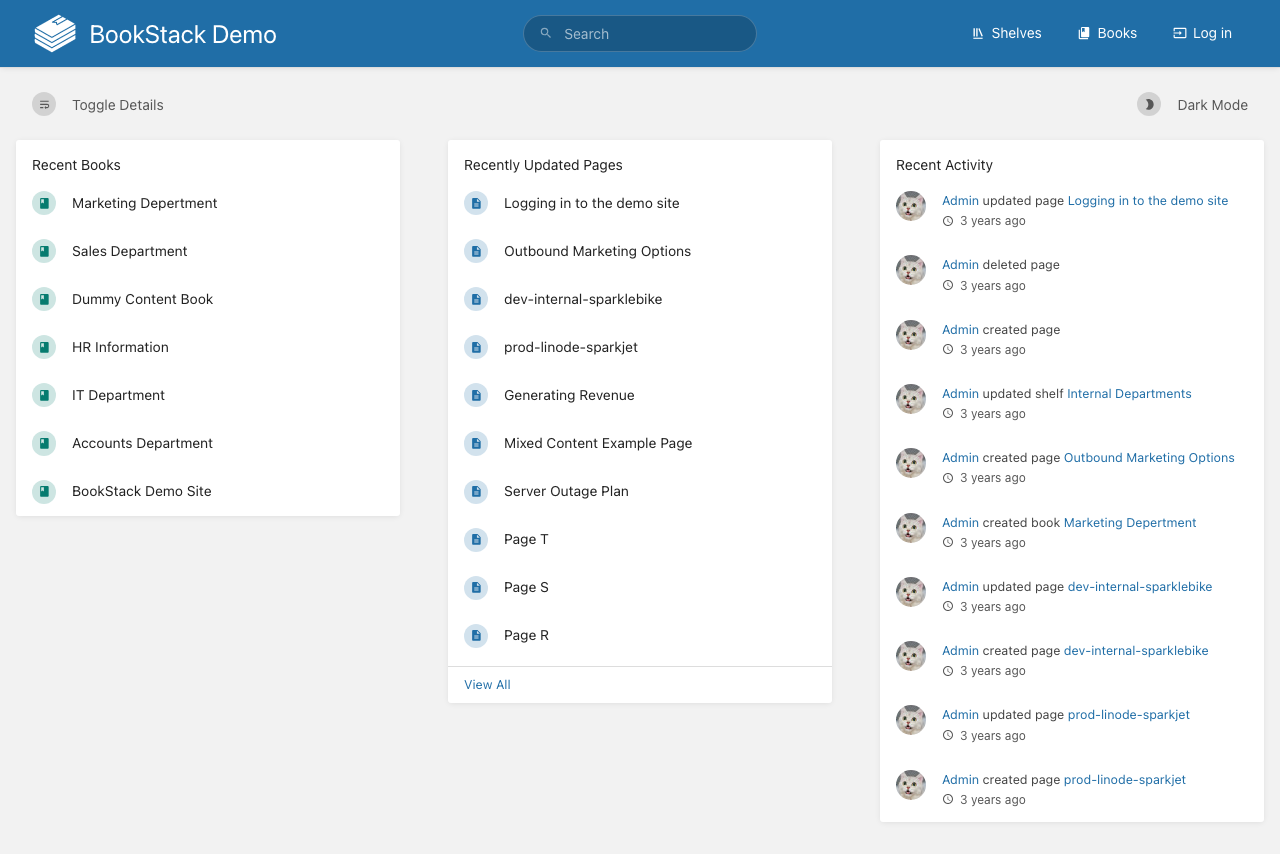
The top navigation bar contains the Search field [2], along with links to Shelves [3] and Books [4] — the two primary ways to browse content.
Navigating the Interface
BookStack organizes content in a hierarchical structure:
- Shelves — Top-level containers that group related books together
- Books — Collections of chapters and pages around a specific topic
- Chapters — Optional groupings within a book
- Pages — Individual documents containing your actual content
Use the Toggle Details button [5] to expand or collapse descriptions on list views. The Dark Mode toggle [6] switches the interface between light and dark themes.
Your First Steps
To start using BookStack effectively:
- Browse existing content through the Shelves or Books navigation links
- Use the search bar to find specific topics across all content
- Create a new book to begin organizing your own documentation
- Add pages within that book to write your content
The search function supports full-text search across all books, chapters, and pages, making it possible to locate information without knowing exactly where it's stored.